

no touch
Instant Transparent Screen Lock to Prevent Accidental Touches
Quickly overlay a transparent protective shield on your current screen. Whether you are watching videos, listening to music, researching, reading, or taking care of children.
Crystal-clear transparency without obstructing content
Instant activation for rapid, secure screen protection anytime
Effectively blocks accidental touches from palms and pockets


Key Features of no touch
Transform your experience with no touch's main features.
No Touch,no touch app,touch blocker,accidental touch blocker,transparent touch blocker,touch protection,screen touch blocker,Android app,Android utility,Android tools,productivity app,screen overlay,transparent overlay,keep screen on,phone utility,GitHub app,indie developer,app development,useful apps,Android productivity,mobile tools,utility app,phone tricks,Android tips,YouTube Shorts,open source app
Transparent lock screen overlay
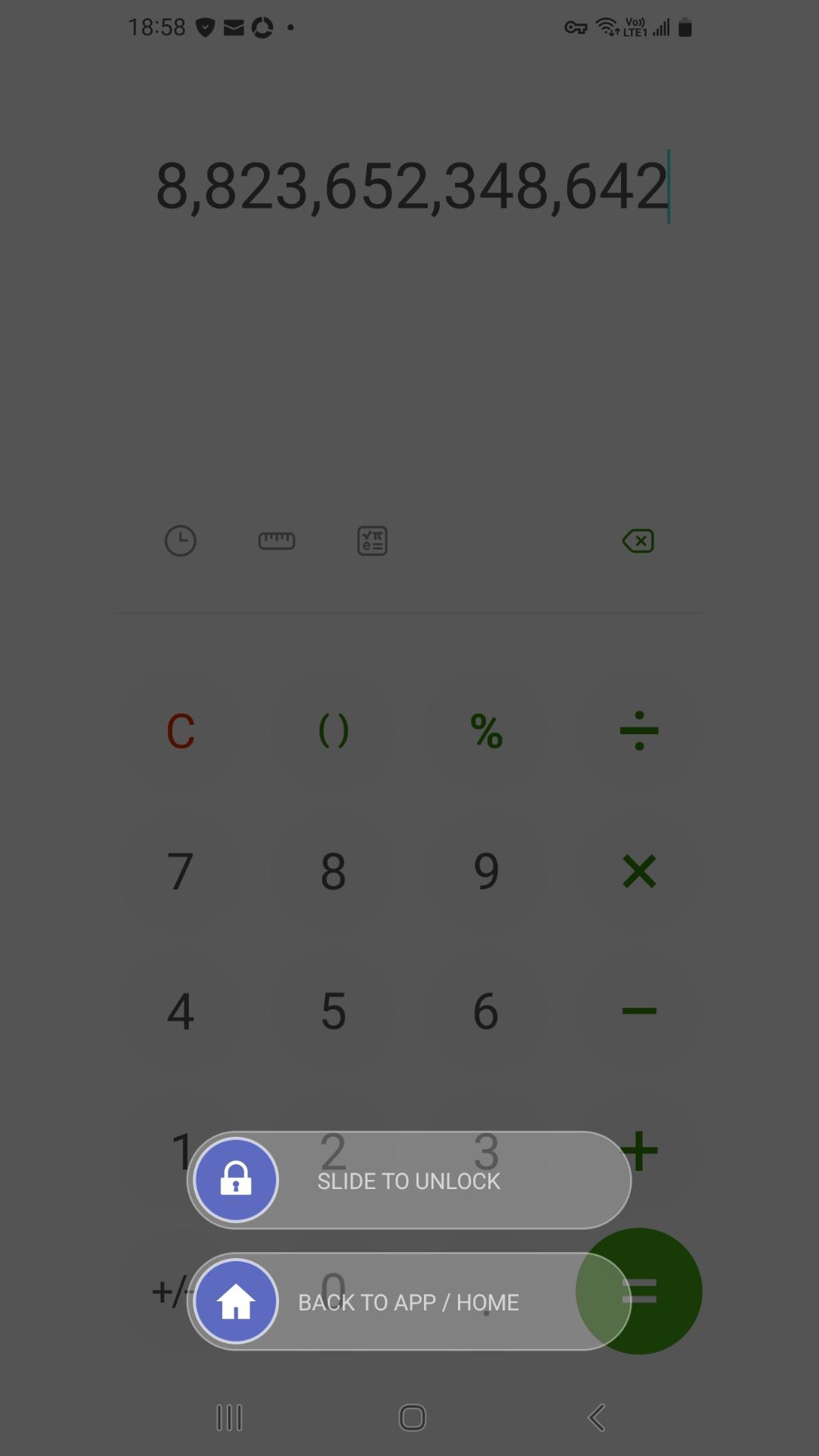
When you want to retain data during reconciliation and calculation, and also perform review tasks.Adds a transparent lock layer over whatever is currently on your screen, helping prevent accidental taps while still letting you see the content underneath.

Stay on the current page.
Preserve current data.
Prevent accidental touches on screen data.
No Touch,no touch app,touch blocker,accidental touch blocker,transparent touch blocker,touch protection,screen touch blocker,Android app,Android utility,Android tools,productivity app,screen overlay,transparent overlay,keep screen on,phone utility,GitHub app,indie developer,app development,useful apps,Android productivity,mobile tools,utility app,phone tricks,Android tips,YouTube Shorts,open source app
Floating button activation
When you are looking up information or referring to recipes, you need to keep looking at the information from that page. This frees up your hands, allowing you to easily refer to the information and do what you want.
Floating ball shortcut for instant one-tap locking
Supports scheduling and flexible display configurations
Lightweight architecture, power-efficient, and low resource consumption
No Touch,no touch app,touch blocker,accidental touch blocker,transparent touch blocker,touch protection,screen touch blocker,Android app,Android utility,Android tools,productivity app,screen overlay,transparent overlay,keep screen on,phone utility,GitHub app,indie developer,app development,useful apps,Android productivity,mobile tools,utility app,phone tricks,Android tips,YouTube Shorts,open source app
Give you a clean lock screen.
Customize your lock screen image and give yourself freedom. Even choose not to display any text or images, not even logos or dates.
Choose your picture freely. For example, a photo you took, or your favorite pattern.
Turn off display patterns, logos, text, dates and times, greatly reducing interference with the screen.
Built-in patterns allow the lock screen pattern to be understood, preventing accidental touches.
No Touch,no touch app,touch blocker,accidental touch blocker,transparent touch blocker,touch protection,screen touch blocker,Android app,Android utility,Android tools,productivity app,screen overlay,transparent overlay,keep screen on,phone utility,GitHub app,indie developer,app development,useful apps,Android productivity,mobile tools,utility app,phone tricks,Android tips,YouTube Shorts,open source app
Enjoy your precious time.
Want to avoid screen scrolling while watching videos or listening to music? Or, when you need to briefly leave your device or find it inconvenient to operate, and you need to keep it in your pocket, you can activate the transparent lock screen with just one button.
Browse the currently playing music track at any time.
Watch your favorite videos and freely turn off the display of logos, images, and text.
Enjoy uninterrupted time and avoid the screen scrolling away from your current view.
No Touch,no touch app,touch blocker,accidental touch blocker,transparent touch blocker,touch protection,screen touch blocker,Android app,Android utility,Android tools,productivity app,screen overlay,transparent overlay,keep screen on,phone utility,GitHub app,indie developer,app development,useful apps,Android productivity,mobile tools,utility app,phone tricks,Android tips,YouTube Shorts,open source app
One-Tap Screen Lock
A single button locks the current screen, eliminating the hassle of accidental touches and screen scrolling.
A single touch creates a transparent lock screen, displaying the date and your favorite custom pattern.
The patterns and floating ball effects make it easy for you to identify the button without having to search for it.
The display function can be turned off freely, giving users a clean lock screen.
No Touch,no touch app,touch blocker,accidental touch blocker,transparent touch blocker,touch protection,screen touch blocker,Android app,Android utility,Android tools,productivity app,screen overlay,transparent overlay,keep screen on,phone utility,GitHub app,indie developer,app development,useful apps,Android productivity,mobile tools,utility app,phone tricks,Android tips,YouTube Shorts,open source app
📥 Choose Your Version
[* 🏆 Exclusive Early Access Edition(Mirrors-Green button), Description: Experience new features and updates ahead of the Releases..🔗 GitHub .🔗 apkpure .🔗itch.io] [. 🛡️ Official Stable Version- Google Play Store ]
https://github.com/Err0x404/no_touch
https://apkpure.com/p/com.shotersgamelife.notouch.app
https://shotersgamelife.itch.io/no-touch
Why choose no touch
Streamline your life with no touch today!

Quick lock/unlock switching
Designed for fast toggling between normal use and touch-blocked mode so you can lock the screen interaction when needed and return to control quickly.

Adjustable locked/unlocked screen areas
Provides flexibility to manage which parts of the screen are touch-blocked versus usable, allowing real-time adjustments to fit different apps and situations.

Double-click lock configuration change
Supports switching between different lock configurations via a simple double-click, making it easy to change how the lock behaves without digging into menus.
📥 Choose Your Version
___
[* 🏆 Exclusive Early Access Edition with Mirrors(-Green button)]
___
[. 🛡️ Official Stable Version- Google Play Store ]


Reviews about no touch
Discover our users' feelings and comments.
I've been using no touch for a while, and it’s amazing! The design is intuitive, and the features work seamlessly.

User 1
Aug 8, 2026
I can't get enough of no touch! It’s fun and engaging. It’s worth every download!
User 2
Jul 28, 2026
no touch has greatly enhanced my experience. The performance is top-notch. Five stars from me!
User 3
Jul 14, 2026
FAQs about no touch
Browse the most frequently asked questions that you may interested in.
What is the “no touch” app and what does it do?
No touch is a transparent lock-screen utility app. It lets you quickly place a transparent lock overlay on top of your current screen to reduce or prevent accidental touches.
How do I activate the lock?
The current version primarily controls this via a floating button or the notification bar. You can minimize the application to the background, go to the screen you want to protect, and then tap the floating button or the notification bar to activate the transparent screen lock.
Why would someone use no touch?
It’s commonly used to prevent accidental taps—such as when kids are holding the phone, during video calls,Consulting materials and referencing recipes , or when playing videos/audio while the phone is in a pocket—so the screen isn’t unintentionally touched.
Does it lock only touch input, or does it also affect buttons/keys?
Sources describe it as disabling touch input, and also mention modes that can hide or block system keys/buttons (i.e., “screen and keys” lock behavior), depending on the lock mode/version.
How can I unlock or turn off the lock once it’s enabled?
Version mode supports quick unlocking. In addition to the original floating ball startup, it also supports notification bar mode to reduce screen interference and preset scheduling methods, which can be set according to time or date. Users can activate the transparent lock screen according to their different habits.
Does no touch require special permissions?
Depending on how the app works, launching features requires a "permission flow," meaning that enabling features such as floating buttons/locking behaviors may require requesting permissions. Specific permissions depend on the version and device.
Is there any other language interfaces available?
Language support for this app includes English, Traditional Chinese.
Is no touch still being actively tested or improved?
The official team continues to monitor and maintain the app, providing corresponding versions for different platforms and channels.
Say Goodbye to Accidental Touches — Get no touch Today!
Install no touch now and enjoy a completely interruption-free mobile experience with crystal-clear transparent screen lock and quick floating ball controls.
Let's keep in touch!
Subscribe to our newsletter for the latest news and updates.
By subscribing, you agree to no touch Privacy Policy.